 Joan León
 A conference website is built for people to read: a schedule you go through from top to bottom, speaker cards with photos, a big button to buy a ticket. But more and more often, whoever checks that website isn’t a person but an agent acting on someone’s behalf: “What time is Andrey Sitnik speaking?”, “Which talks cover local AI?”. And that agent runs into an interface nobody designed for it.
With the GeeksCAT Conf 2026 website (Girona, September 26) we wanted to try the alternative: the website tells the agent what it can look up and how, instead of the agent guessing. The schedule includes talks like Jordi Mas’s on local AI and Dario Castañé’s on AGENTS.md, so it made sense to practice what we preach and try WebMCP on our own website.
The challenge: it’s a 100% static site, generated with Astro and served from GitHub Pages. No server, no backend. The code is at GeeksCAT/conf-2026-web.
The problem with DOM scraping
Today, when an agent wants to pull information from a website, it has three options, and all three are fragile:
- Reading the DOM and inferring the structure: which
h3is a talk title, whichspanis a time. - Guessing CSS selectors that nobody has committed to keeping. If a redesign changes a class, the agent spends more tokens finding the element again, or it makes up results because, without that DOM element, it has no deterministic data to work from.
- Interpreting screenshots, which is slow, expensive in tokens and the most direct route to a hallucination: a misread time, a speaker assigned to the talk next door.
// ❌ Bad: the agent infers the schedule from markup nobody promised to keep
const talks = [...document.querySelectorAll(".agenda-item")].map(el => ({
  time: el.querySelector("time")?.textContent,
  title: el.querySelector("h3")?.textContent,
}));
// ✅ Good: the agent calls a tool the page registered, with a known schema
get_agenda({ locale: "en" });
// → { conference: "GeeksCAT Conf 2026", locale: "en", schedule: [...] }
The web has no native way to tell an agent “this page offers these actions, with these parameters”. We have semantic HTML and ARIA for assistive technologies, and structured data for search engines, but nothing designed for an agent to call a function on the page.
What is WebMCP?
WebMCP brings the idea of the Model Context Protocol to the browser. The page registers tools with a name, a natural-language description, a JSON Schema for the parameters and a function that runs them. The agent working in that tab discovers the tools and calls them, instead of interpreting the interface.
I already used it in WebPerf Snippets + WebMCP, where the tools return code to measure performance. This case is simpler: there’s nothing to run on the page, only data to serve.
The difference from a classic MCP server is where the tools run: inside the page, with its origin and its session, and only while the page is open. If the visitor is logged in, the tool works with that session; if they close the tab, the tools go away with it.
WebMCP’s current status:
- It isn’t a W3C standard. It’s a draft from the Web Machine Learning Community Group, published as a Draft Community Group Report, with editors from Microsoft and Google.
- The API is exposed on
document.modelContext. In early Chrome preview builds it was onnavigator.modelContext, which is the one I used in WebPerf Snippets. - Support: Chrome has had an origin trial since version 149, and Edge since 150. Firefox and Safari have open requests in their standards-positions repositories. The up-to-date summary is in the project’s implementation status page.
Architecture for a static site
WebMCP assumes there’s JavaScript on the page registering tools. On a static site that’s not a problem. What we don’t have is a server to answer queries, so the data is generated at build time and the tool only has to read it.
We split it into three layers:
- Discovery: a static manifest at
/.well-known/webmcp.json. - Data: JSON endpoints that Astro generates at build time.
- Registration: a script that registers the tools with
document.modelContextwhen the API exists.
Layer 1: discovery with /.well-known/webmcp.json
With the WebMCP API, an agent only discovers the tools once it has loaded the page and run its JavaScript. To let an agent know what the site offers before visiting it, we publish a manifest at /.well-known/webmcp.json:
{
  "name": "GeeksCAT Conf 2026",
  "url": "https://conf.geeks.cat",
  "version": "1.0.0",
  "endpoints": {
    "agenda": "/api/agenda.json",
    "speakers": "/api/speakers.json",
    "event": "/api/event.json"
  },
  "tools": [
    {
      "name": "get_agenda",
      "description": "Returns the complete conference schedule (sessions, timings, titles, speakers, and abstracts) for GeeksCAT 2026 in Girona.",
      "inputSchema": {
        "type": "object",
        "properties": {
          "locale": {
            "type": "string",
            "enum": ["ca", "en", "es"],
            "default": "ca"
          }
        }
      }
    }
    // get_speakers (optional speaker_slug) and get_conference_info follow the same shape
  ]
}
Three tools, all read-only:
get_agenda: the full schedule, with sessions, times and abstracts.get_speakers: speakers with bio, topic and social links; it accepts aspeaker_slugto request a single one.get_conference_info: date, venue, tickets and contact.
This manifest is not part of WebMCP. RFC 8615 defines the mechanism behind /.well-known/ paths, but webmcp.json isn’t registered with IANA and the spec doesn’t mention it. The same goes for the <link rel="mcp-manifest"> we’ll see in layer 3. The project README explains that defining tools only in static manifests was considered and rejected, because a manifest can’t change with the page state or contain the code that runs the tool. The service workers explainer also mentions a tool manifest that crawlers and directories could index, and considers it limited for the same reason: it’s static.
We publish it anyway because neither argument applies in our case: the schedule doesn’t depend on who’s browsing or on the page state, and the code that runs the tool is in the layer 3 script. The cost is a few small files. No agent currently documents support for it, so we publish it in case one starts.
Since we don’t know which name anyone would look for, we ended up publishing the same document at three paths, with two <link rel="mcp-manifest"> tags in the HTML:
/.well-known/webmcp.json, the name the protocol carries./.well-known/mcp.json, which comes from classic MCP, the server one. SEP-1649 proposed publishing a server card there, so clients could discover remote MCP servers without connecting first. That proposal is closed, the one that continues it (SEP-2127) uses/.well-known/ai-catalog.json, and a server card carries a requiredtransportfield our manifest doesn’t have, because there’s no MCP server behind it./.well-known/webmcp, with no extension, in case a client tries that shape.
The three files are byte-identical, and the extensionless one has a problem: GitHub Pages infers the content type from the extension, so it serves that copy as application/octet-stream instead of application/json. A client that checks the header will discard it. Until there’s a specified mechanism, this is what we have: trying names to see which one lands, and accepting that two of the three are dead weight.
One thing to improve: the manifest and the script describe the same tools twice, and maintaining them by hand is the fastest way for them to drift apart. On our site, the descriptions of get_speakers and get_conference_info already differ between the two files, and the manifest declares ca as the default language while the script uses the page’s language. The sensible approach is to define the tools in a single module and generate the manifest at build time with an Astro endpoint, which is exactly what layer 2 does.
Layer 2: JSON endpoints generated at build time
Astro lets us define endpoints in src/pages/ that return anything, not just HTML. With output: 'static', each endpoint runs once during the build and its response is written to a file: src/pages/api/agenda.json.ts ends up as dist/api/agenda.json. GitHub Pages serves it like any other static file, with no server cost.
This is a simplified version of the schedule endpoint. The schedule mixes talks (session) with blocks that have no speaker (spacer), such as registration, the coffee break or lunch, and the full version returns a different shape for each type:
// src/pages/api/agenda.json.ts
import { getCollection } from "astro:content";
import type { APIRoute } from "astro";

export const prerender = true;

const locales = ["ca", "en", "es"] as const;

export const GET: APIRoute = async () => {
  const talks = await getCollection("talks");
  const speakers = await getCollection("speakers");
  const result: Record<string, unknown[]> = {};

  for (const locale of locales) {
    // Speakers indexed by slug, in the same language as the talks
    const speakerMap = new Map(
      speakers
        .filter(s => s.data.locale === locale)
        .map(s => [
          s.data.slug,
          { name: s.data.name, slug: s.data.slug, role: s.data.role },
        ])
    );

    result[locale] = talks
      .filter(t => t.data.locale === locale && !t.data.draft)
      .sort((a, b) => a.data.time.localeCompare(b.data.time))
      .map(t => ({
        slug: t.data.slug,
        title: t.data.title,
        time: t.data.time,
        end: t.data.end,
        // Only sessions have a speaker; spacers (registration, breaks, lunch) do not
        speaker:
          t.data.type === "session"
            ? (speakerMap.get(t.data.speakerSlug) ?? null)
            : null,
        // The Markdown body of each talk doubles as its abstract
        abstract: t.body?.trim() ?? "",
      }));
  }

  return new Response(JSON.stringify(result, null, 2), {
    headers: {
      "Content-Type": "application/json",
      "Cache-Control": "public, max-age=3600",
    },
  });
};
Three details about this layer:
- A single source of truth. The endpoint reads the same content collections that render the schedule and speaker pages. If a talk’s time is corrected, it changes in the HTML and in the JSON at the same time; they can’t drift apart, which is the opposite of the layer 1 manifest.
- All three languages in one file.
agenda.jsonhasca,enandesas keys, and the tool downloads the whole file to keep one of them. It’s 38 KB uncompressed for a one-day schedule, so it isn’t worth making it more complex. For a large catalogue, splitting it by language (/api/en/agenda.json) withgetStaticPathswould be the better option. - The
Cache-Controlheader is dropped. In a static build, Astro only writes the response body; the headers are lost. What the client receives is whatever GitHub Pages decides:cache-control: max-age=600, the same for every file. If we need a different caching policy, it’s configured at the hosting level, not in the endpoint.
Layer 3: registration in the browser
In BaseLayout.astro we add the link to the manifest and the script that registers the tools:
<!-- AI / WebMCP discovery and tool provider -->
<link rel="mcp-manifest" href="/.well-known/webmcp.json" />
<link rel="mcp-manifest" href="/.well-known/mcp.json" />
<script is:inline src="/scripts/webmcp.js" defer></script>
is:inline tells Astro not to process or bundle the script: it’s served as-is from public/scripts/. With defer, it doesn’t block rendering.
In WebPerf Snippets I loaded the registration with a dynamic import() only when the API existed, so it added no cost in browsers without support. Here the script always loads, and that’s on purpose: it’s small and, as we’ll see in the testing section, window.__webmcpTools lets us test the tools from any browser.
The script, with get_agenda as the example:
// public/scripts/webmcp.js
(() => {
  async function fetchJson(url) {
    try {
      const res = await fetch(url);
      if (!res.ok) throw new Error(`HTTP ${res.status}`);
      return await res.json();
    } catch (err) {
      console.warn("[WebMCP] Failed to fetch data:", url, err);
      return null;
    }
  }

  const tools = {
    get_agenda: {
      name: "get_agenda",
      description:
        "Returns the complete conference schedule (sessions, timings, titles, speakers, and abstracts) for GeeksCAT 2026 in Girona.",
      inputSchema: {
        type: "object",
        properties: {
          locale: { type: "string", enum: ["ca", "en", "es"] },
        },
      },
      execute: async params => {
        // Fall back to the page language when the agent does not ask for one
        const lang = params?.locale || document.documentElement.lang || "ca";
        const data = await fetchJson("/api/agenda.json");
        if (!data) return { error: "Unable to retrieve agenda" };
        return {
          conference: "GeeksCAT Conf 2026",
          locale: lang,
          schedule: data[lang] || data.ca || [],
        };
      },
    },
    // get_speakers and get_conference_info follow the same pattern
  };

  // Plain object on window: lets anyone call execute() from the DevTools console
  window.__webmcpTools = tools;

  // document.modelContext is where the spec places the API;
  // navigator.modelContext is where early Chrome builds exposed it;
  // window.modelContext is where some polyfills and inspectors leave it
  function registerTools() {
    const ctx =
      document.modelContext || navigator.modelContext || window.modelContext;
    if (!ctx || typeof ctx.registerTool !== "function") return false;

    for (const tool of Object.values(tools)) {
      const res = ctx.registerTool({
        name: tool.name,
        description: tool.description,
        inputSchema: tool.inputSchema,
        execute: tool.execute,
      });
      // registerTool() returns a promise, so a failure arrives as a rejection
      res?.catch(err =>
        console.warn(`[WebMCP] Failed to register tool "${tool.name}":`, err)
      );
    }
    console.info("[WebMCP] Registered tools for GeeksCAT 2026");
    return true;
  }

  // The script is deferred, so the API may not be there on the first attempt
  if (!registerTools()) {
    addEventListener("DOMContentLoaded", registerTools, { once: true });
    addEventListener("load", registerTools, { once: true });
  }
})();
Some notes on the script:
- Three locations for the same API. The spec places it on
document.modelContext. Early Chrome builds exposed it onnavigator.modelContext, andwindow.modelContextis where some polyfills and inspectors leave it. The script tries all three, in that order. In Chrome Canary with the flag enabled,typeof document.modelContextreturns"object", so the other two branches never run: they are there just in case. - One retry, because the script is deferred. It runs before
DOMContentLoaded, and if the API isn’t there yet, it tries again onDOMContentLoadedand onload. Without that retry, an API that shows up later gets no tools registered. registerTool()returns a promise. A registration failure arrives as a rejection, not as an exception, so each call carries its own.catch(). The success message, on the other hand, is logged without waiting for those promises: it can appear even if a registration fails a moment later. That’s the rough edge of this layer.- No
annotationsyet. The spec defines annotations such asreadOnlyHint, which tell the agent that calling a tool changes nothing. All three only read public data, so they qualify, but the script doesn’t send them. execute()only reads. All the logic is afetchto a JSON file that already exists and a filter by language. If the network fails, the tool returns an{ error }instead of throwing, and the agent gets a response it can interpret.
A note on
window.__webmcpTools: exposing the tools onwindowmeans any script on the page can call them. That’s not a problem here, because they only read public data. Tools that change state, such as buying a ticket or submitting a form, shouldn’t be left onwindow.
Testing it in Chrome DevTools
There are two levels of testing, depending on what we want to check.
Tool logic, in any browser
window.__webmcpTools exists whether or not the browser supports WebMCP. If we open conf.geeks.cat and the DevTools console, we can call execute() directly:
// Full schedule in English
await window.__webmcpTools.get_agenda.execute({ locale: "en" });

// A single speaker
await window.__webmcpTools.get_speakers.execute({
  locale: "en",
  speaker_slug: "andrey-sitnik",
});

// Date, venue, tickets and contact
await window.__webmcpTools.get_conference_info.execute();
![The DevTools console in Chrome Canary on conf.geeks.cat. At the top, the message [WebMCP] Registered tools for GeeksCAT 2026, logged from webmcp.js:130. Below it, three calls: get_agenda returns an object with conference 'GeeksCAT Conf 2026', locale 'ca' and a schedule array of 15 items; get_conference_info returns the date 2026-09-26, the location in Girona and the event URLs; and get_speakers returns count 10 with the speakers array. The last line runs typeof document.modelContext and answers 'object'.](https://res.cloudinary.com/nucliweb/image/upload/f_auto,q_auto/joanleon.dev/assets/webmcp-static-site-astro/DevTools-WebMCP-Console)
The calls in the screenshot run on the Catalan page and pass no locale, which is why they return ca: without that parameter, the tool uses the page language.
It’s the same function the agent would call, so it covers the fetch, the default language and the error cases. What it doesn’t test is the registration.
Registration, with WebMCP enabled
To test registration we need a browser that implements the API:
- Enable
chrome://flags/#enable-webmcp-testingand restart Chrome. - Reload the page and check in the console that
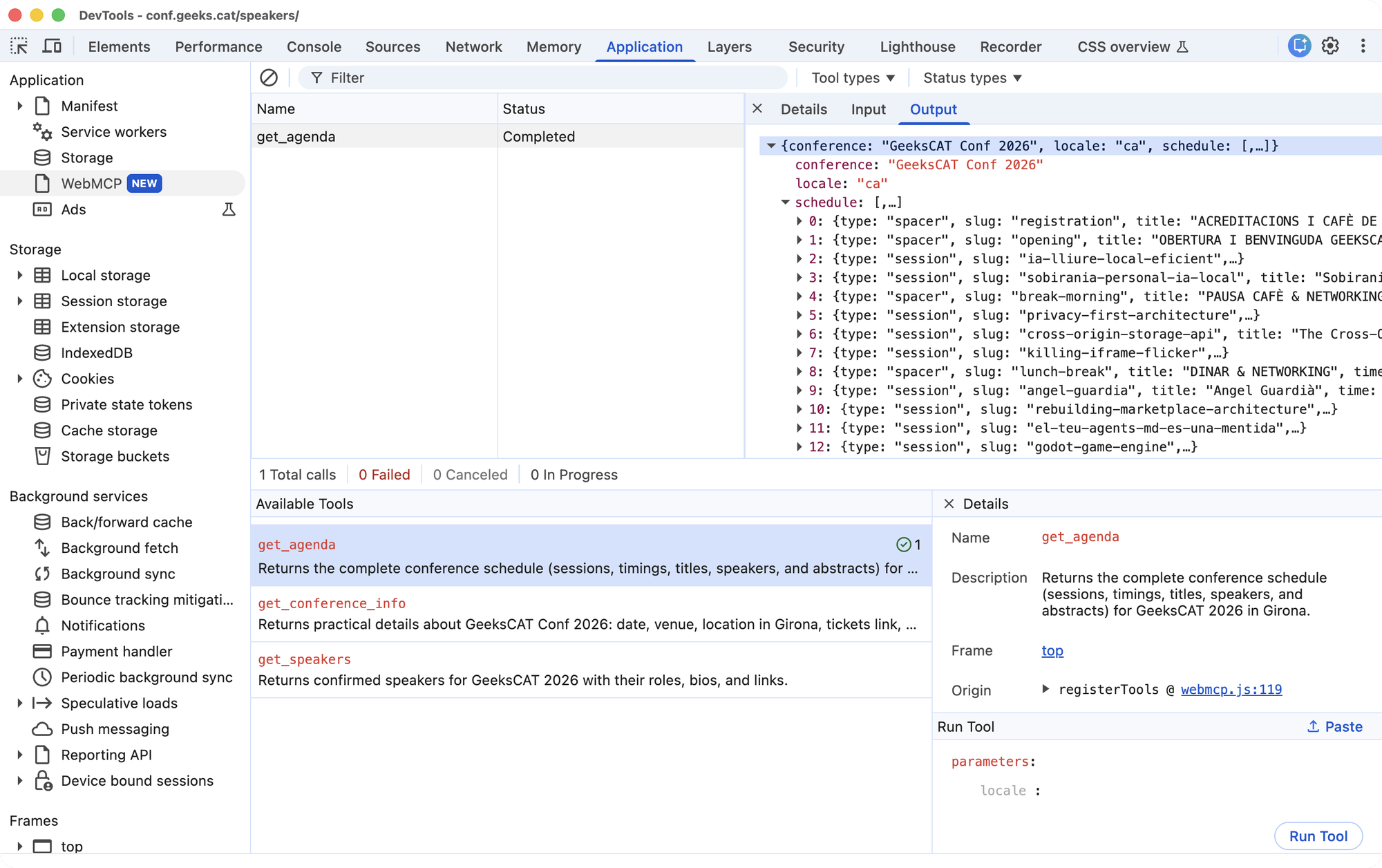
document.modelContextexists and that the script confirms registration with a[WebMCP]message. - Open the Application > WebMCP panel in DevTools, which lists the registered tools, lets you invoke them by hand and shows what they return. The Model Context Tool Inspector extension does the same in browsers where that panel isn’t there yet.
This is the panel with the three tools registered and one get_agenda call already completed:
The Chrome documentation on WebMCP covers this local development flow in more detail.
For layer 1, requesting the manifest is enough:
curl -sI https://conf.geeks.cat/.well-known/webmcp.json
GitHub Pages serves it with content-type: application/json and access-control-allow-origin: *, so an agent can read it from any origin.
Conclusion
On a static site, WebMCP costs little: data we already had, generated at build time from the same content that renders the pages, and a script of just over a hundred lines. In browsers without support, that script only leaves the tools on window.__webmcpTools.
The API is in origin trial, and the /.well-known/ manifest is our own convention, not part of the spec. For a read-only website like a conference’s, the difference from publishing structured data is smaller than it seems. Where WebMCP adds real value is in actions with parameters and with the visitor’s session: filtering the schedule by topic, booking a workshop seat, buying a ticket.
What’s still missing is discovery before visiting the page. Until that’s specified, each site will invent its own manifest, as we did. If you want to see how it evolves, conf.geeks.cat is live, and if you’re coming to Girona on September 26, let’s talk about it in person.