 Joan León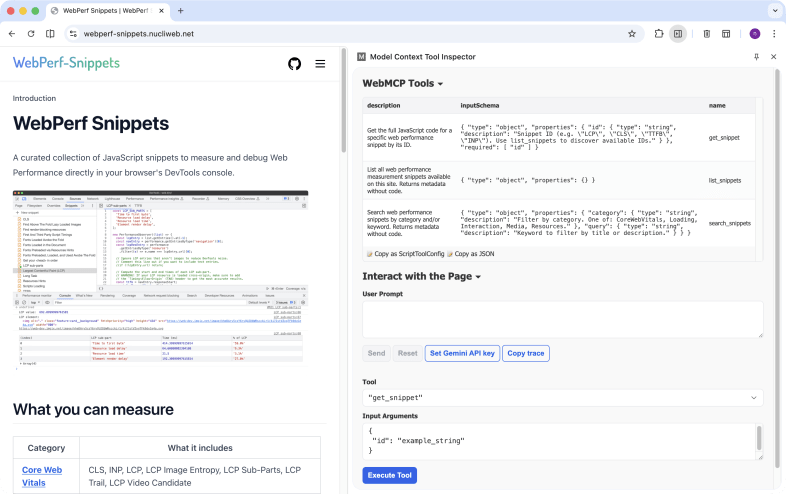
We’ve spent years building tools to measure web performance: console scripts, browser extensions, DevTools panels. They all have one thing in common: a person operates them. Someone who knows what to measure, when to run it, and how to interpret the result.
With WebMCP that’s starting to change. And in WebPerf Snippets we’ve taken the first step: exposing performance measurement tools so any AI assistant can discover, understand, and run them directly in the browser.
What is MCP and what does it have to do with the browser?
Model Context Protocol (MCP) is an open standard that defines how language models can interact with external tools. Instead of an AI improvising actions, MCP provides a clear contract: these are the available tools, this is what they do, this is how you use them.
MCP already works in many contexts: servers, code editors, desktop applications. But the browser is a different environment. Code runs in a sandbox, there’s no direct access to the file system, and interaction happens in the context of a specific web page.
WebMCP is the W3C’s proposal to solve exactly that: a native protocol for websites to expose structured tools that AI agents can use reliably. The API integrates directly into the browser through navigator.modelContext.
The difference from an AI “browsing” and directly manipulating the DOM is significant: instead of the agent interpreting the visual interface and simulating clicks, the site explicitly tells it what it can do and how. More speed, more precision, fewer interpretation errors.
The three tools WebPerf Snippets exposes
The integration registers three tools via navigator.modelContext:
list_snippets
Returns all available snippets with their metadata: identifier, category, title, description, and URL. No code. It’s the entry point for an agent to discover what measurement tools exist.
// An agent can ask: "what snippets are available?"
// list_snippets returns something like:
[
  {
    id: "LCP",
    category: "CoreWebVitals",
    title: "Largest Contentful Paint",
    description:
      "Measures the render time of the largest image or text block visible in the viewport",
    url: "https://webperf-snippets.nucliweb.net/...",
  },
  // ... all 31 available snippets
];
get_snippet
Returns the full JavaScript code for a snippet by ID. When an agent wants to run a specific measurement, this tool gives it the code ready to use.
// "Give me the code to measure LCP"
get_snippet({ id: "LCP" });
// → returns the complete JavaScript for the snippet
search_snippets
Filters snippets by category and/or keyword. Useful when an agent doesn’t know the exact ID but knows the area of interest.
// "Show me everything related to Core Web Vitals"
search_snippets({ category: "CoreWebVitals" });

// "Find snippets about images"
search_snippets({ keyword: "image" });
With these three tools, the complete workflow is covered: discover what exists, search for what’s relevant, and get the code to run it.
How to try it (today)
WebMCP is in prototype phase. To try it you need:
- Chrome 146+ Canary with WebMCP flags enabled
- Verify that
navigator.modelContextis available in the console - Go to webperf-snippets.nucliweb.net and call the tools from a compatible agent
You can check the Chrome Early Preview Program and the webmcp-tools repository from Google Chrome Labs to follow the implementation’s progress.
Zero cost for other browsers
One of the requirements I felt was important to meet from the start: adding WebMCP support shouldn’t impact page load for visitors using browsers without support.
The solution is straightforward: the snippets registry loads as a dynamic import that only runs if navigator.modelContext exists. In a standard browser, that chunk is never downloaded.
if (navigator.modelContext) {
  const { snippets } = await import("./snippets-registry.js");
  // register tools...
}
Zero network cost, zero extra parsing, zero performance impact for the majority of visitors.
What this means for AI-assisted debugging
In my performance audits, one of the most repetitive steps is running the same set of scripts to collect metrics: LCP, INP, CLS, resource load times, font analysis. With WebMCP, that set of scripts can become an automated flow that an AI agent runs, interprets, and provides recommendations on.
It’s not about replacing the judgment of whoever is analyzing performance. It’s about removing friction: going from “I need to copy this script, paste it into the console, interpret the output” to “analyze the LCP of this page and tell me if there are improvement opportunities.”
An important clarification: WebMCP exposes the code, it doesn’t execute it
Here it’s worth being precise. If you want to analyze the LCP of web.dev using WebPerf Snippets + WebMCP, the tools registered on webperf-snippets.nucliweb.net give you the snippet code, but they don’t run it on another page automatically.
For the complete flow to work, the AI agent needs browser control capabilities. The real process would be:
- The agent visits
webperf-snippets.nucliweb.net→ callsget_snippet({ id: "LCP" })→ gets the JavaScript - The agent navigates to
web.dev→ injects and runs that code in its context - The agent reads the result and provides recommendations
Without that browser automation capability (via CDP, Puppeteer, or an agent with browser control), WebMCP on WebPerf Snippets acts as a structured, discoverable repository: the agent knows what tools exist and how to use them, but running them on third-party sites requires one more step.
It’s an important distinction that reflects the current state of the technology. WebMCP defines the contract; the automation layer that closes the loop is evolving in parallel.
WebPerf Snippets has been that collection of scripts used manually for years. With this integration, it’s also becoming a collection that agents can discover and use in a structured way, ready for when that automation layer matures.
Conclusion
WebMCP is still a W3C draft and the API is only available in Chrome Canary. But the model is clear: websites expose structured tools, AI agents discover and use them natively. WebPerf Snippets is already prepared for that scenario.
Meanwhile, there’s an alternative that’s available today: the Agent Skills for WebPerf Snippets. Using Chrome DevTools MCP, an agent can navigate to any page and run the snippets directly, without waiting for browser support. Two approaches to the same goal — I cover that in detail in WebPerf Snippets and Agent SKILLs: deterministic audits with Chrome DevTools MCP.