 Joan León
 In the previous article we covered what WebGPU is and when it makes sense to use it. Now it’s time to get into the code. Image processing is the most accessible use case to start with WebGPU: the data is well-known (pixels), the operation is uniform, and the performance benefit is measurable and visible.
We’re going to implement a Gaussian blur filter first with Canvas 2D and then with WebGPU, and compare the results.
The problem with Canvas 2D
Canvas 2D has filter: blur(), which is convenient but not configurable. If we need something more elaborate (a blur with variable radius, a custom convolution, or a real-time filter over a sequence of frames), we end up processing pixels manually on the CPU.
// Manual blur in Canvas 2D — this runs on the CPU
function applyBlurCPU(imageData, radius) {
  const { data, width, height } = imageData;
  const output = new Uint8ClampedArray(data.length);

  for (let y = 0; y < height; y++) {
    for (let x = 0; x < width; x++) {
      let r = 0,
        g = 0,
        b = 0,
        count = 0;

      for (let ky = -radius; ky <= radius; ky++) {
        for (let kx = -radius; kx <= radius; kx++) {
          const nx = Math.max(0, Math.min(width - 1, x + kx));
          const ny = Math.max(0, Math.min(height - 1, y + ky));
          const i = (ny * width + nx) * 4;
          r += data[i];
          g += data[i + 1];
          b += data[i + 2];
          count++;
        }
      }

      const i = (y * width + x) * 4;
      output[i] = r / count;
      output[i + 1] = g / count;
      output[i + 2] = b / count;
      output[i + 3] = data[i + 3];
    }
  }

  return new ImageData(output, width, height);
}
For a 1920×1080 image with radius 5, that’s ~230 million operations. On the CPU, this takes between 200ms and 500ms. Unusable in real time.
Same filter with WebGPU
With WebGPU, the same blur runs on the GPU, with thousands of pixels processed in parallel.
Initial setup
async function initWebGPU() {
  if (!navigator.gpu) throw new Error("WebGPU not available");

  const adapter = await navigator.gpu.requestAdapter();
  if (!adapter) throw new Error("No GPU adapter found");

  const device = await adapter.requestDevice();
  return device;
}
The WGSL shader
The shader is the program that runs on the GPU. Each invocation processes one pixel:
@group(0) @binding(0) var inputTex: texture_2d<f32>;
@group(0) @binding(1) var outputTex: texture_storage_2d<rgba8unorm, write>;

@compute @workgroup_size(16, 16)
fn main(@builtin(global_invocation_id) id: vec3<u32>) {
  let size   = vec2<i32>(textureDimensions(inputTex));
  let coords = vec2<i32>(i32(id.x), i32(id.y));

  if (coords.x >= size.x || coords.y >= size.y) { return; }

  let radius: i32 = 5;
  var color = vec4<f32>(0.0);
  var count: f32 = 0.0;

  for (var ky: i32 = -radius; ky <= radius; ky++) {
    for (var kx: i32 = -radius; kx <= radius; kx++) {
      let sample = clamp(coords + vec2<i32>(kx, ky), vec2<i32>(0), size - 1);
      color += textureLoad(inputTex, sample, 0);
      count += 1.0;
    }
  }

  textureStore(outputTex, coords, color / count);
}
Pipeline and execution
async function applyBlurGPU(device, imageBitmap) {
  const { width, height } = imageBitmap;

  // Input texture
  const inputTexture = device.createTexture({
    size: [width, height],
    format: "rgba8unorm",
    usage:
      GPUTextureUsage.TEXTURE_BINDING |
      GPUTextureUsage.COPY_DST |
      GPUTextureUsage.RENDER_ATTACHMENT,
  });

  // Copy image to GPU texture
  device.queue.copyExternalImageToTexture(
    { source: imageBitmap },
    { texture: inputTexture },
    [width, height]
  );

  // Output texture
  const outputTexture = device.createTexture({
    size: [width, height],
    format: "rgba8unorm",
    usage: GPUTextureUsage.STORAGE_BINDING | GPUTextureUsage.COPY_SRC,
  });

  // Shader module
  const shaderModule = device.createShaderModule({ code: BLUR_SHADER_WGSL });

  // Pipeline
  const pipeline = device.createComputePipeline({
    layout: "auto",
    compute: { module: shaderModule, entryPoint: "main" },
  });

  // Bind group
  const bindGroup = device.createBindGroup({
    layout: pipeline.getBindGroupLayout(0),
    entries: [
      { binding: 0, resource: inputTexture.createView() },
      { binding: 1, resource: outputTexture.createView() },
    ],
  });

  // Encode and submit commands
  const encoder = device.createCommandEncoder();
  const pass = encoder.beginComputePass();
  pass.setPipeline(pipeline);
  pass.setBindGroup(0, bindGroup);
  pass.dispatchWorkgroups(Math.ceil(width / 16), Math.ceil(height / 16));
  pass.end();

  device.queue.submit([encoder.finish()]);
  await device.queue.onSubmittedWorkDone();

  return outputTexture;
}
Benchmarks
Applying blur with radius 5 to images at different resolutions:
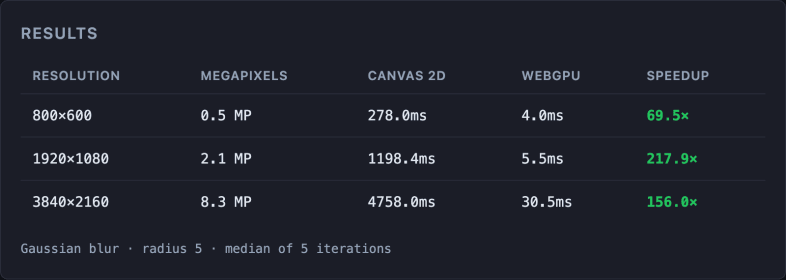
Real measurements on MacBook Air M4, Apple Metal-3 GPU. Gaussian blur radius 5, median of 5 iterations. Times vary by hardware · run the benchmark on your device (source code).
The gap widens with resolution because the pixel count grows quadratically and the GPU scales far better than the CPU.
Real use cases
The same pattern supports:
- Photo filters (brightness, contrast, saturation, sepia) in an image editor
- Edge detection (Sobel filter) for CV in the browser
- Real-time processing over a
<video>stream or webcam - Layer compositing (image blending, alpha masks)
The key is always the same: if the operation can be expressed as “apply this to each pixel independently”, the GPU will win.
Considerations
Transfer latency
Copying data between CPU and GPU has a cost. For images processed only once, that cost may outweigh the benefit. WebGPU makes sense when processing is recurrent (real time, multiple frames).
Texture format
WebGPU works with specific formats (rgba8unorm, rgba16float…). Make sure to use the right format for the precision needed.
Fallback
Always implement the Canvas 2D version as a fallback for Firefox and browsers without WebGPU.
The series
- WebGPU: the browser’s new performance engine
- Image processing in the browser with WebGPU — you are here
- ML in the browser with WebGPU: TensorFlow.js with the WebGPU backend, real-time inference.
- Video editing in the browser with WebGPU: real-time effects frame by frame.
Conclusion
The same filter that takes the CPU 280ms to apply, the GPU resolves in 8ms. For any web application that processes images intensively (editors, design tools, real-time filters), WebGPU is the right choice.
In the next article we raise the complexity: ML in the browser with TensorFlow.js using WebGPU as the backend.