 Joan León
CSS frameworks based on the “Utility-First” pattern are gaining a lot of traction in the frontend world, especially Tailwind CSS. Is it a good option? Does it cover all needs in all scenarios? Should we use it in our next project?
Disclaimers
- What you’ll read here is my opinion, based on my experiences and my point of view.
- Everything I present is the result of my research: reading documentation, consulting people who have used it, watching YouTube videos, online courses, analyzing online sites where they’ve used Tailwind CSS, and reading code, lots of code, and implementing it in a couple of small projects.
Origin of Utility-First
The first reference I found about Utility-First is from the creator of Tailwind CSS himself, Adam Wathan, in the article CSS Utility Classes and “Separation of Concerns”. Where Adam explains step by step the process that led him to select this pattern for developing his projects.
What is Utility-First?
The concept of Utility-First refers to basing style implementation using utility classes as the first option, not as the only option (we’ll see that later).
We’ve been using utility classes for a long time. Who doesn’t remember the mythical clearfix? Utility classes are present in most CSS frameworks, even Bootstrap has quite a few utilities.
I have to say that my perception of this “new” pattern changed when I read In Defense of Utility-First CSS by Sarah Dayan (yes, the woman from the Tailwind CSS demo). At dotCSS 2019 Sarah gave a talk with the same title, In Defense of Utility-First CSS.
Sarah starts that article with the following paragraph.
“Favor composition over inheritance”. This piece of wisdom from Design Patterns, one of the most influential software engineering books, is the foundation of Utility-First CSS. It also shares many principles with functional programming: immutability, composability, predictability, and avoidance of side-effects. The goal behind all those fancy terms is to write code that’s easier to maintain and to scale.
Throughout the article, she argues why she believes Utility-First is the evolution of CSS development. She responds to all the buts we have about this new pattern. But I believe it’s a statement that can’t be taken lightly. The same story always repeats for any new framework, library, functionality, or utility—it doesn’t work for everything, it always depends.
Let’s say I want to implement PostCSS at Adevinta, as I mentioned in the previous article. We’re currently using Sass, there’s no PostCSS knowledge among colleagues. It requires a change, acquiring knowledge, time. That is, we might never use PostCSS to write CSS at Adevinta.
What Utility-First is NOT
One of the arguments from people who reject this pattern is: it’s like writing inline CSS. Well no, it’s not. And whoever defends that argument doesn’t know CSS. But let’s see what they mean.
This is an example of HTML code implementing Tailwind CSS:
<p
  class="max-w-screen-lg mb-10 text-lg font-medium sm:mb-11 sm:text-2xl sm:leading-10"
>
  "Tailwind CSS is the only framework that I've seen scale on large teams. It's
  easy to customize, adapts to any design, and the build size is tiny."
</p>
This would be the same code with inline CSS:
<p
  style="max-width: 1024px; font-size: 1.125rem; line-height: 1.75rem; font-weight: 500; margin-bottom: 2.5rem;"
>
  "Tailwind CSS is the only framework that I've seen scale on large teams. It's
  easy to customize, adapts to any design, and the build size is tiny."
</p>
In this case, only code outside media queries is being implemented, since in inline styles we have no syntax to define them, or states like hover.
I’ve perceived a false sense that Tailwind CSS allows us to add media queries to inline styles, well no, they’re classes. Just like we have in other CSS frameworks.
Also, let’s not forget that inline styles have higher specificity, and if we want to change the margin-bottom of that paragraph without having access to the HTML (or template) we’ll have to do it with a class and an !important 😱.
Tailwind Ecosystem
Let’s see the reason why, I believe, Tailwind is having so much traction.
One of the most important things in a project is documentation. Bootstrap had great expansion and acceptance for being a framework with good documentation.
A place to see a component example, include styles from a CDN, copy the example code and BOOOOM! It works the first time.
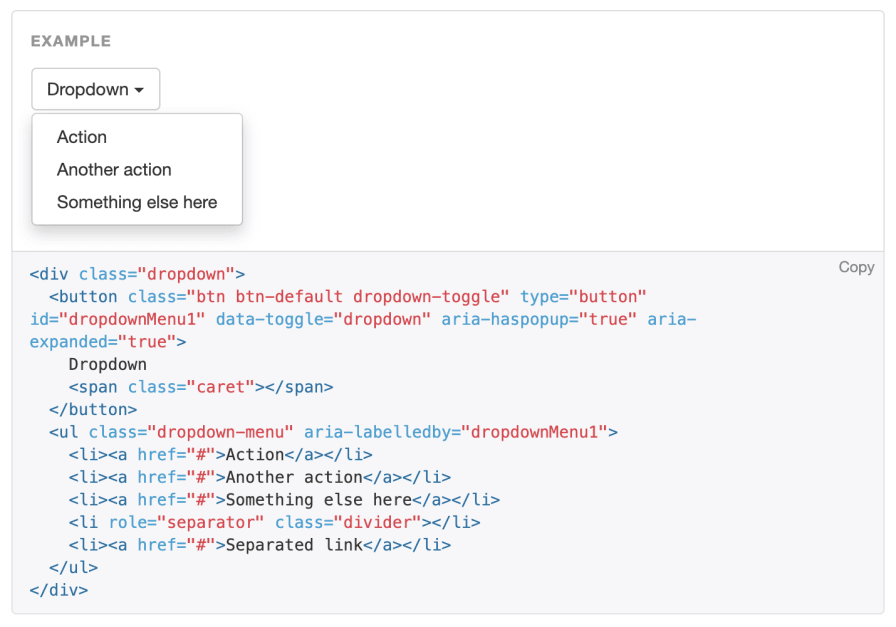
The dream of every Backend and Frontend person who doesn’t touch CSS 😓.
Documentation
On one hand, we have the website which allows us to read very detailed and well-structured documentation, with integration examples with most of the currently most-used frameworks.
In addition to the documentation, it has Tailwind PLAY where we can try the framework online. It’s also very useful for sharing code and being able to review it.
Another learning channel we have is the YouTube channel Tailwind Labs, where we’ll find everything from specific videos on how to implement something in Tailwind CSS, to interviews, like How do you convince your boss to use Tailwind CSS? by my MDE colleague Debbie O’Brien.
Community
They’ve enabled the Discussions section in the repository, with the intention of creating a support community. And speaking of community, they’ve also launched on the trendy platform, Discord with more than 15 thousand registered people, and great activity.

Design
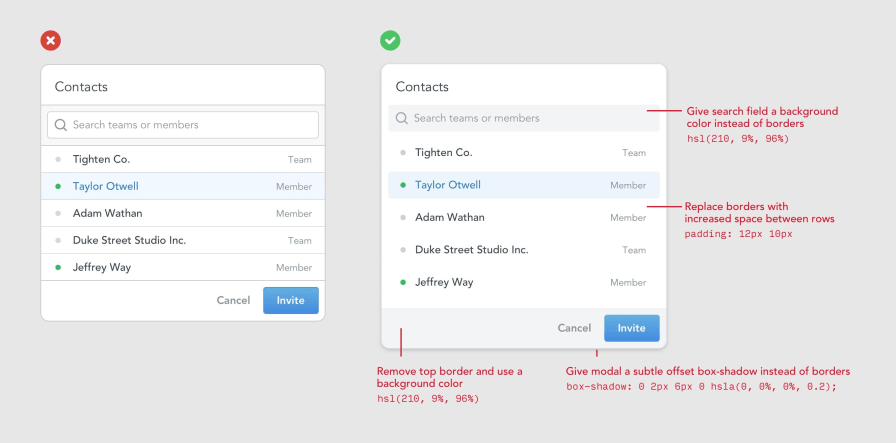
One of the resources most sought after by the development community is having good design resources. Well in this case we also have the opportunity to get the book Refactoring UI, in which they show us with clear examples how to improve the user interface of our projects.
We also have Tailwind UI at our disposal, a component library based on Tailwind CSS of course, where we can compose our page with pre-designed components.
They’re grouped into Application UI, where we’ll see components for designing interfaces, and Marketing where we’ll find more complete components, with a focus on solving marketing needs, like a Call to Action, a newsletter signup section, or a footer structure. All of them designed and developed to work perfectly on any device.

I know a use case of a colleague who with Tailwind UI, two people who have been in manager roles for years (they code little now 🤪), built the Crypto Advisor website in less than two days.
Among the resources that Tailwind offers us we’ll find Heroicons, from the creators of Tailwind CSS. We’ll also find Hero Patterns, which actually strays quite far from Tailwind’s philosophy, as it’s a tool to generate background patterns (very cool by the way) with SVG. But of course, this is precisely what’s growing Tailwind CSS’s popularity, finding a place where they offer us solutions to a lot of “problems” we encounter in developing a project.
Other tools
Other interesting tools that will greatly help the Tailwind CSS developer community grow are:
- IntelliSense: An extension for VS Code editor that suggests and autocompletes Tailwind CSS classes.
- Hypercolor: A collection of pre-designed gradients using Tailwind CSS’s default color palette colors.
- Tailwind Ink: A tool that allows us to configure a color palette and get the
themeconfiguration object to add to our project. It also has a Figma plugin. - Tailwind CSS UI: A UI Kit for Figma, where we’ll have a design oriented to be built with Tailwind CSS.
- Sketch UI Kit for Tailwind CSS: A UI Kit for Sketch, where we’ll have a design oriented to be built with Tailwind CSS.
- Tailwind CSS Document CLI: A CLI command to consult available Tailwind CSS classes. E.g.:
tw radius. - colour-a11y: Accessibility test for Tailwind CSS color palette.
- Tailwind Weekly: A weekly newsletter with news related to Tailwind CSS.
As you can see, there are many resources, there are more, but I’ll let you investigate a bit on your own 😊.
My Opinion
Now yes, I’ll answer what you expected to find when reading the article title, my opinion.
I have to confess it’s the article that has been hardest for me to write. I’ve started it several times, and I’ve deleted and rewritten several paragraphs. I have mixed feelings and the more I dig, the more separated those feelings are 😅.
What I like about Tailwind
There are several things I like about Tailwind.
- First is that it’s based on PostCSS, I already said it in the article I prefer PostCSS, PostCSS is good.
- The modular plugin system behind the framework seems like a very good scalability option to me.
- The documentation is very well structured and clear.
- The ecosystem and community being generated around it.
- I find the playground very useful, as well as the IntelliSense extension for VS Code.
- The optimization system is very good, but of course, there’s not much secret, in the HTML we have all the classes that will be used. That facilitates purging unused CSS.
What I don’t like about Tailwind
Well, where do I start?
The first thing I don’t like is the message “You’ll never have to write CSS again”.
It’s curious that for some time I’ve perceived there’s like an obsession to achieve a solution to not have to write CSS. Look, SuperMegaUltraMasters of frontend, CSS is part of the web, I don’t know why this fixation on moving away from it.
They’re offering a tool that distances developers from CSS.
They haven’t defined a naming pattern, as is the case with BEM, but give us a list of classes to memorize, and yes they’ve already proposed being able to customize it [Feature proposal] configurable class names, attention spoiler the issue is closed No concrete plans to support this so going to close for now 🙈.
Having to customize the theme and configure tokens in the tailwind.config.js file, when it can be done with custom properties, I don’t like. And no, I don’t accept that in Internet Explorer 11 we can’t use custom properties, Tailwind CSS 2 doesn’t support Internet Explorer 11.
The fact that the HTML looks pretty ugly has already been said, right?
<div
  class="md:py-16 grid grid-cols-1 sm:grid-cols-2 sm:gap-x-8 sm:px-8 sm:py-12"
>
  <div
    class="relative z-10 col-start-1 row-start-1 bg-gradient-to-t from-black px-4 pb-3 pt-40 sm:bg-none"
  >
    <p class="text-white sm:text-gray-500 text-sm font-medium sm:mb-1">
      Entire house
    </p>
    <h2
      class="text-white sm:text-black md:text-3xl text-xl font-semibold sm:text-2xl sm:leading-7"
    >
      Beach House in Collingwood
    </h2>
  </div>
  <div class="col-start-1 row-start-2 px-4 sm:pb-16">
    <div class="my-5 flex items-center text-sm font-medium sm:mb-4 sm:mt-2">
      <svg width="20" height="20" fill="currentColor" class="text-violet-600">
        <path
          d="M9.05 3.691c.3-.921 1.603-.921 1.902 0l1.07 3.292a1 1 0 00.95.69h3.462c.969 0 1.372 1.24.588 1.81l-2.8 2.034a1 1 0 00-.364 1.118l1.07 3.292c.3.921-.755 1.688-1.539 1.118l-2.8-2.034a1 1 0 00-1.176 0l-2.8 2.034c-.783.57-1.838-.197-1.539-1.118l1.07-3.292a1 1 0 00-.363-1.118l-2.8-2.034c-.784-.57-.381-1.81.587-1.81H7.03a1 1 0 00.95-.69L9.05 3.69z"
        />
      </svg>
      <div class="ml-1">
        <span class="text-black">4.94</span>
        <span class="md:inline sm:hidden">(128)</span>
      </div>
      <div class="mx-2 text-base font-normal">·</div>
      <div>Collingwood, Ontario</div>
    </div>
    <hr class="border-gray-300 hidden w-16 sm:block" />
  </div>
  <div class="col-start-1 row-start-3 space-y-3 px-4">
    <p class="text-black flex items-center text-sm font-medium">
      <img
        src="/kevin-francis.jpg"
        alt=""
        class="bg-gray-100 mr-2 h-6 w-6 rounded-full"
      />
      Hosted by Kevin Francis
    </p>
    <button
      type="button"
      class="bg-violet-100 text-violet-700 rounded-lg px-6 py-2 text-base font-semibold"
    >
      Check availability
    </button>
  </div>
  <div class="col-start-1 row-start-1 flex sm:col-start-2 sm:row-span-3">
    <div class="grid w-full grid-cols-3 grid-rows-2 gap-2">
      <div class="md:col-span-2 relative col-span-3 row-span-2">
        <img
          src="/beach-house.jpg"
          alt=""
          class="bg-gray-100 absolute inset-0 h-full w-full object-cover sm:rounded-lg"
        />
      </div>
      <div class="md:block relative hidden">
        <img
          src="/beach-house-interior.jpg"
          alt=""
          class="bg-gray-100 absolute inset-0 h-full w-full rounded-lg object-cover"
        />
      </div>
      <div class="md:block relative hidden">
        <img
          src="/beach-house-view.jpg"
          alt=""
          class="bg-gray-100 absolute inset-0 h-full w-full rounded-lg object-cover"
        />
      </div>
    </div>
  </div>
</div>
It’s curious that in the examples they’re not using semantic HTML
I see a trend coming to write code that will be very hard to maintain.

This code is taken from a real case 🙈.
Conclusions
Is it a good option? Does it cover all needs in all scenarios? Should we use it in our next project?
Utility-classes have their utility, but they involve knowing what each one does, what CSS is behind them, knowing CSS well enough to know when to use them, how, and in case of conflicts, knowing what to do to solve it.
They won’t work to solve all situations. Not long ago, I found it quite funny to see how the framework creator asked for help on twitter to solve something he couldn’t do with the framework (his framework). Yes, he was giving away a t-shirt to whoever gave him the solution that fit best.
Recently I had a conversation with a friend starting a new project, and he explained his approach of having CSS with utility classes. As he explained the approach to me, I think it’s fine, it has a very narrow context, it will work for a Design System, not for millions of websites. That said, I told him what I’ve already said above, to create a good solution you need to know CSS, you need to be a CSS craftsperson to achieve a good product.
I don’t think you have to choose a side, whether to be for or against utility-classes or Tailwind CSS in particular. We should be pragmatic, if we have a project and with Tailwind CSS we can set up a landing page in 2 days, as the Crypto Advisor folks did, great, it’s a good option.
Tailwind CSS is not the future of CSS, it’s not the best way to implement CSS, it’s neither better nor worse than Bootstrap, it’s simply another paradigm.
If you know what you’re doing, use Tailwind CSS if you think it will cover the need you have, but if you have doubts, my advice is don’t do it. Learning Tailwind CSS is to CSS, what a JS framework is to JavaScript.