 Joan León
 I was reviewing skills.addy.ie, the site for the Agent Skills project I’ve been collaborating on, and I was doing it the way I almost always do: with DevTools open. It’s an occupational habit; I open them out of routine to look for things to improve, not because anything felt slow. And that’s how I caught it, almost in passing, in the Network panel: every internal link I clicked triggered a 301 redirect before the page loaded. Not one, not on one specific page: all of them. /skills, /lifecycle, /compare, /docs/getting-started… all responded first with a 301 to their trailing-slash version.
It looks harmless, but a 301 on every navigation is a whole round trip that visitors pay before the page even starts downloading. I ended up opening a PR to the repository to fix it. Let’s look at what I found, why it happened, and why the obvious fix wasn’t quite the right one.
What I saw in DevTools
In the Network panel, browsing the site and clicking the menu links, the pattern repeated on every click:
GET /skills                 301  220 ms   → /skills/
GET /skills/                200   65 ms
GET /docs/getting-started   301  406 ms   → /docs/getting-started/
GET /docs/getting-started/  200   47 ms
GET /lifecycle              301  251 ms   → /lifecycle/
GET /lifecycle/             200   99 ms
GET /teach                  301  440 ms   → /teach/
GET /teach/                 200   46 ms
GET /compare                301  507 ms   → /compare/
GET /compare/               200   58 ms
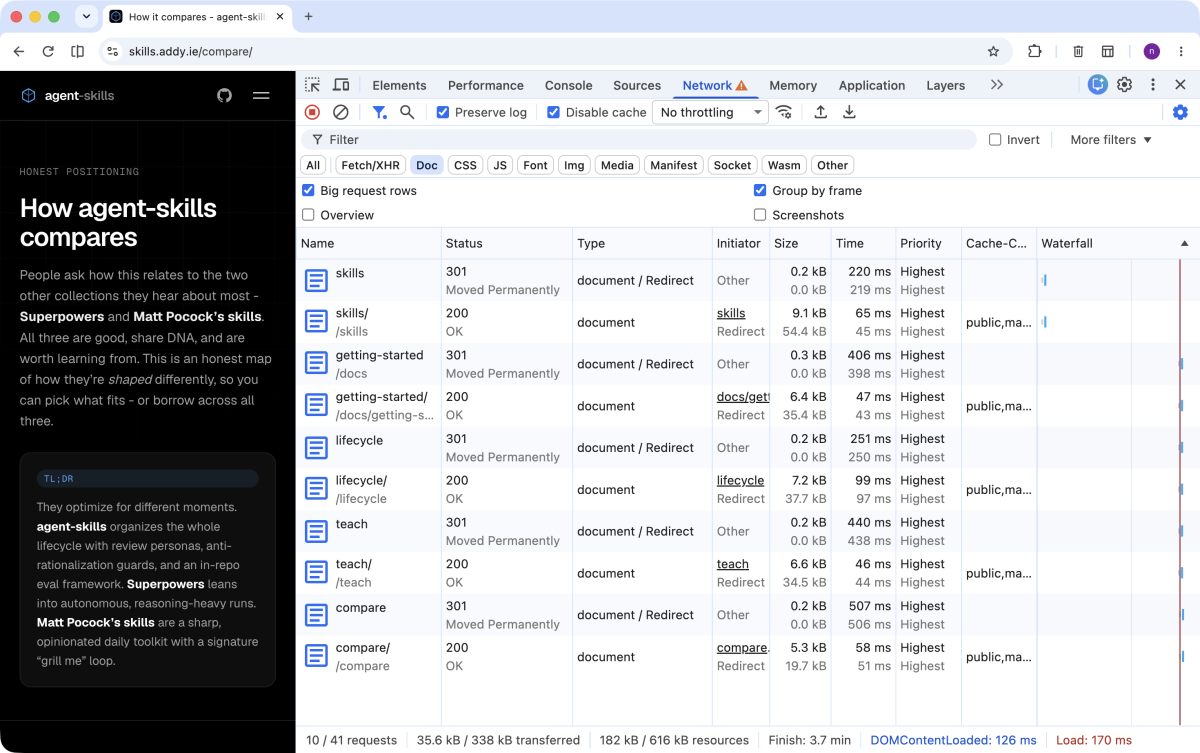
301 Moved Permanently to the trailing-slash URL and then the real 200. The 301 for /compare takes 507 ms on its own. Enlarge imageEach navigation is two requests: first the slash-less URL, which returns a 301 with a Location pointing to the same URL with a trailing slash, and then the correct URL, which finally returns the 200 with the document. The server is Netlify.
Those 301s cost from 220 ms to 507 ms per click, adding up to 1.82 seconds of latency in redirect hops alone across a five-navigation session. And it’s not time spent downloading anything useful: if I look at the breakdown of the /compare 301, almost all of it is wait, the server response time:
blocked   1 ms
send      0 ms
wait    505 ms
receive   1 ms
With no DNS or handshake (the connection was already open and reused), the 301 is a full round trip whose only job is to answer “this page is one character further along, request it again with the slash”. The real document doesn’t start arriving until the second request.
How it affects UX
A single 301 goes unnoticed. The problem is that here it happened on every internal navigation, so the cost isn’t a one-off, it’s a toll paid over and over throughout the visit. A visitor clicks a link and, before seeing anything, the browser makes a round trip to the server that doesn’t paint a single pixel.
And that cost gets worse exactly where it hurts most: on high-latency networks. On a mobile connection or far from Netlify’s edge, an extra round trip isn’t 200 ms, it’s easily 400 or 500 ms per click. And I measured this on a good connection, so it counts as one of the best cases, not the worst. Multiply it across a session of ten or fifteen navigations and we’re spending seconds of accumulated waiting that add nothing.
The first fix that came to mind
The first thing I thought, seeing that the 301 always went from /route to /route/, was the obvious one: change the links so they already point to the trailing-slash URL. If the link points straight to /skills/, there’s nothing to redirect.
<!-- ❌ Bad: link triggers a 301 to /skills/ -->
<a href="/skills">Browse skills</a>

<!-- ✅ Good: link points straight to the canonical URL -->
<a href="/skills/">Browse skills</a>
It’s correct, but it’s treating the symptom link by link. Before touching anything I wanted to understand why the site generated slash-less links when its canonical URL did carry one. If we patch without understanding the cause, the problem comes back the moment someone adds the next slash-less link.
Cloning the repo and understanding the context
I cloned the repository and used Claude Code to map where the links came from and how the build was configured. The cause wasn’t a stray link, but the combination of three things:
- Astro builds in
directoryformat by default. Each page is emitted as/<route>/index.html, so its canonical URL carries a trailing slash:/skills/. - The internal links were written without the slash. And most weren’t stray literals but generated dynamically (the navigation data arrays, the catalog cards), which is why they weren’t obvious at a glance.
- Netlify, by default, canonicalizes with a 301. When you request
/skills, the host responds with a redirect to the/skills/that does exist as a directory. It’s the host’s standard behavior for serving directory-format output.
There’s one missing piece that explains why this wasn’t visible locally: Astro’s dev server, with the default trailingSlash: 'ignore', serves both /skills and /skills/ with a direct 200. The redirect only shows up on the static production host. In the development environment, everything looked perfect. The bug lived exactly in the gap between how the dev server serves URLs and how Netlify does.
The solution
The fix has two parts, and the first is the one that stops the problem from coming back.
1. Make the convention explicit in astro.config.mjs
export default defineConfig({
  trailingSlash: "always",
  // ...
});
With trailingSlash: 'always' two good things happen: the URL convention is declared explicitly, and the dev server starts redirecting too. That is, the mismatch becomes reproducible locally, and any future slash-less link gets caught before it reaches production. It stops being a ghost bug that only exists in the production environment.
2. Add the trailing slash to every internal link
The literals are straightforward, but the ones actually generating most of the redirects were the dynamic ones, like the skill catalog cards:
{/* ❌ Bad */}
href={`/skills/${skill.slug}`}

{/* ✅ Good */}
href={`/skills/${skill.slug}/`}
The same in the data arrays of Nav.astro and Footer.astro, and in the literal links across the pages. External links and file assets (.svg, .png, .pptx…) are left untouched: the trailing slash is a matter of internal routes, not files.
An SEO caveat
Removing the 301 from internal navigation doesn’t mean removing the 301 from the site, and that’s how it should be. Slash-less URLs already indexed or linked from outside will keep receiving Netlify’s 301 to their canonical version, which is exactly the correct canonicalization for SEO: a single valid URL per page, no duplicate content. What the PR fixes is the hop in internal navigation, which was the source of the latency paid by whoever was already inside the site.
How to verify it
The check isn’t “trust me”, it’s measurable. I validated before and after by capturing the Network activity in the same browsing session and comparing the two HAR files with Claude Code. After the fix, it looks like this:
GET /                       200   86 ms
GET /skills/                200   68 ms
GET /docs/getting-started/  200   56 ms
GET /lifecycle/             200   52 ms
GET /teach/                 200   48 ms
GET /compare/               200   43 ms
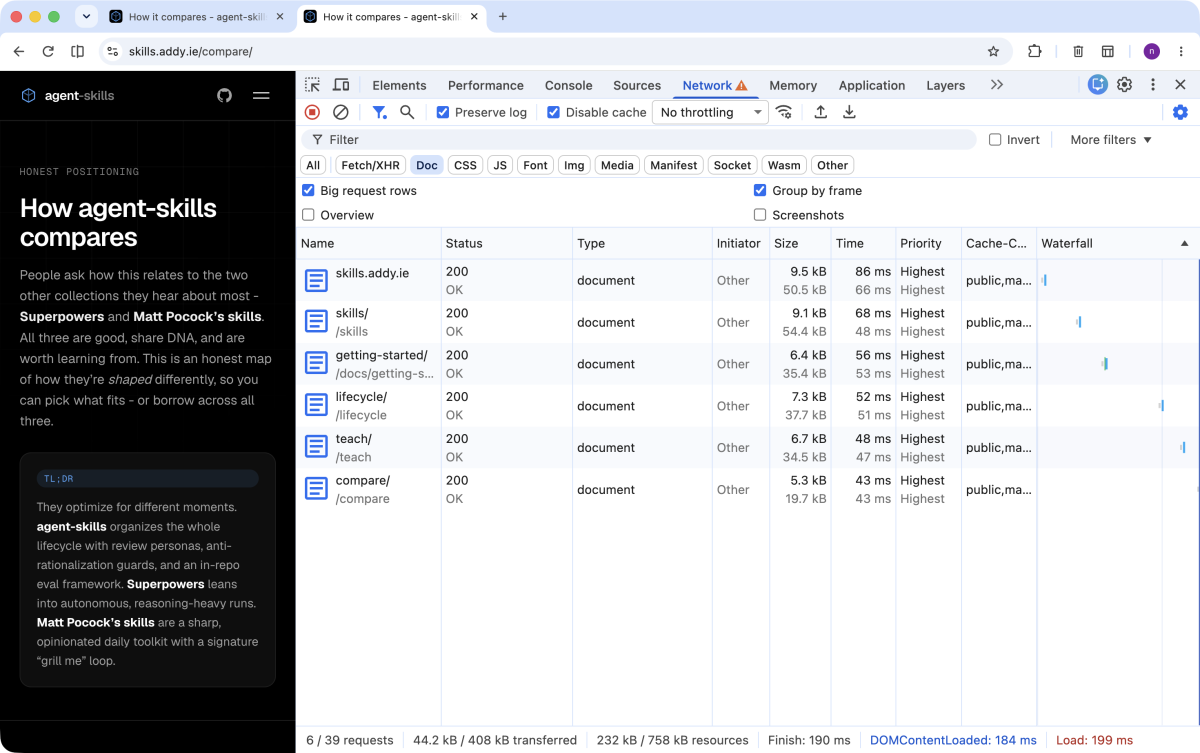
200, without a single redirect. The two requests per click become one. Enlarge imageThe initial load plus the five internal navigations: six direct 200s, zero redirects. The round-trip toll per click is gone.
And how do you keep it from creeping back in without eyeballing DevTools by hand? It’s worth automating the watch:
trailingSlash: 'always'is the first safety net: the dev server redirects, so a slash-less link shows up locally or in E2E tests before it ships.- A lint rule or a
grepover the builtdistin CI that fails if a slash-less internal link appears. - Lighthouse’s Avoid multiple page redirects audit flags redirect chains in production.
What I take away
Three practical takeaways from this case:
- The dev server can mislead you by omission. Not because it fails, but because its defaults are more permissive than the host’s. It’s worth opening DevTools against the real deployed site, not just against
localhost: there are problems (redirects, headers, caching) that only exist in production. - Trailing-slash consistency matters more than it seems. It’s not cosmetic: a mismatch between the canonical URL and the internal links is paid in a round trip per click. Pick a convention and declare it explicitly in the config, so the tooling enforces it for you.
- Before patching the symptom, understand the cause. Changing the links by hand would have worked today and broken with the next link someone added without a slash.
trailingSlash: 'always'turns the rule into something the project itself enforces.
If you have an Astro site on Netlify (or any host that canonicalizes directories), open DevTools, browse around a bit, and look at the status column. If you see 301s where you expected 200s, you know where to start.