 Joan León
 On the verge of enjoying the enormous browsing speeds of 5G technology, which might lead us to think we no longer need to worry about image file sizes, a new image format appears that reduces JPEG images by up to ~50%, leaving them with practically the same quality.
Do we really need another image format?
The most common formats on the web are JPEG, PNG and WebP. There are many other formats, not to mention that within JPEG there are several and currently work is being done on a new standard, JPEG XL.
This might make us think that… on one hand there’s the Joint Photographic Experts Group (JPEG) organization working to improve algorithms to reduce image file sizes while minimizing quality sacrifice, on the other hand, Google is betting on the WebP format which greatly optimizes quality/size. And now, another format appears that could become a standard.
The AV1 Image File Format (AVIF) format is developed by the Alliance for Open Media, an organization focused on developing the best video encoder and decoder. Yes, yes… you read that right, video, specifically the AV1 codec, the most important focus is that it’s open source and royalty-free. Seeing that among the organization’s members are companies like Adobe, Amazon, Cisco, Google, Intel, Microsoft, Mozilla, Netflix or Nvidia, shows that this is serious business.
From video to image
The AV1 encoding algorithm is so effective that if we load a video in .av1 format with a single frame, we would have an image with less file size than the best JPEG or WebP compression. But of course, from the standpoint of semantics and accessibility, it’s not right to load images in a <video> tag. That’s where the specification for the AV1 Image File Format comes in.
Can we use this image format yet?
While I was writing this article, I was able to update Chrome to version 85, which is the version where we already have support for decoding AVIF images.
Chrome 85 adds decode support for AVIF, an image format encoded with AV1 and standardized by the Alliance for Open Media. AVIF offers significant compression gains vs. JPEG and WebP, with a recent Netflix study showing 50% savings vs. standard JPEG and > 60% savings on 4:4:4 content.
Another browser that can display images encoded in AVIF is Firefox starting from version 77, but it requires us to manually enable support. To do this, we need to type about:config in the address bar, then search for avif in the search field to filter configuration parameters and change the value to true. Now we have support for this image format.

Tools to convert to AVIF format
Apart from the official library libavif, encoders and decoders for different languages have started to appear. I’ll dedicate an article to analyzing and comparing some of them.
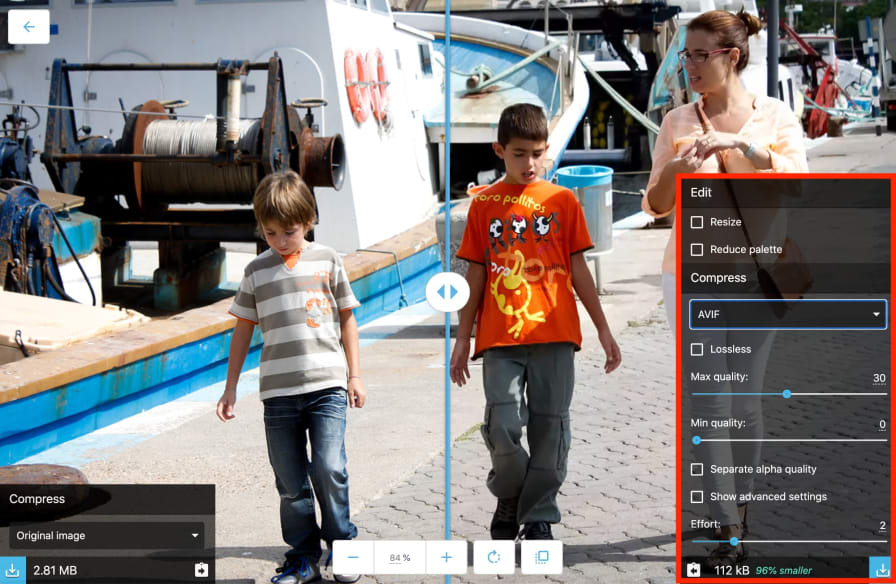
But today, as a first contact, we’re going to use a more intuitive and friendly environment. I’m talking about Squoosh, which already offers support for reading and encoding in AVIF.
Disclaimer
To correctly assess efficiency when comparing between different formats, we need to consider finding a balance with values like SSIM. And additionally, it needs to be done with a considerable number of images, but I’ll leave that for another article.
I’ll do it with some images, letting you try with yours. The quality/size assessment will be: on one hand with the default values the tool offers us, and on the other, adjusting parameters to achieve the best compression without much quality loss solely under my visual criteria.
The original image file sizes are high, as they were saved in PNG format to have a lossless format, and they have a resolution of 1600px width, sufficient size for a hero image.

Encoding with default values
These are the results of converting the original PNG images to MozJPEG, WebP and AVIF.
| Image | PNG (original) | MozJPEG | WebP | AVIF |
|---|---|---|---|---|
| IMG_3248.png | 3.03 MB | 287 kB | 296 kB | 192 kB |
| IMG_5511.png | 3.17 MB | 211 kB | 169 kB | 96.1 kB |
| IMG_5666.png | 2.81 MB | 233 kB | 197 kB | 112 kB |
| IMG_5673.png | 2.32 MB | 194 kB | 161 kB | 99.8 kB |
| IMG_5705.png | 3.29 MB | 319 kB | 316 kB | 205 kB |
| YouTube-banner.png | 43.8 kB | 13.6 kB | 8.66 kB | 4.61 kB |
Encoding by adjusting parameters
To try to be as fair as possible, I’m going to leave the quality value at default values, and make use of other properties. This is where comparing encoders gets complicated, the configuration is totally different, both in its parameters and in their number.
I had thought of adding some screenshots, but there are so many combinations in value changes that it makes it unfeasible. It would be better to create a video to analyze each case, so stay tuned to the 📺 YouTube channel. Oh! If you’re not subscribed, you know what to do: “Leave a 👍🏼 if you liked it, add a comment for any questions, subscribe and hit the 🔔 to receive notifications of new videos”. 😅
These are the adjustments I applied:
MozJPEG
- Separate chroma quality: 40
- Smoothing: 2
WebP
- Effort: 6
AVIF
- Effort: 3 (default is 2, values range from 0 to 10, but at high values the computation time is very high and adds quite a few artifacts to the images.)
| Image | PNG (original) | MozJPEG | WebP | AVIF |
|---|---|---|---|---|
| IMG_3248.png | 3.03 MB | 271 kB | 276 kB | 80.5 kB |
| IMG_5511.png | 3.17 MB | 191 kB | 164 kB | 38 kB |
| IMG_5666.png | 2.81 MB | 211 kB | 183 kB | 44.5 kB |
| IMG_5673.png | 2.32 MB | 172 kB | 145 kB | 38.8 kB |
| IMG_5705.png | 3.29 MB | 283 kB | 311 kB | 86.8 kB |
| YouTube-banner.png | 43.8 kB | 12.8 kB | 8.53 kB | 2.95 kB |
Clearly we can see that the new format greatly reduces image size. And by adjusting parameters it improves even more, although with some images it took more than 2 minutes.
Let’s see how it behaves on the web
Now that we have images encoded in JPEG, WebP and AVIF, let’s add a couple of them to a website to see how browsers behave.
We’ll do it with the <picture> tag which allows us to define several image formats, and the browser will load the first one it can interpret.

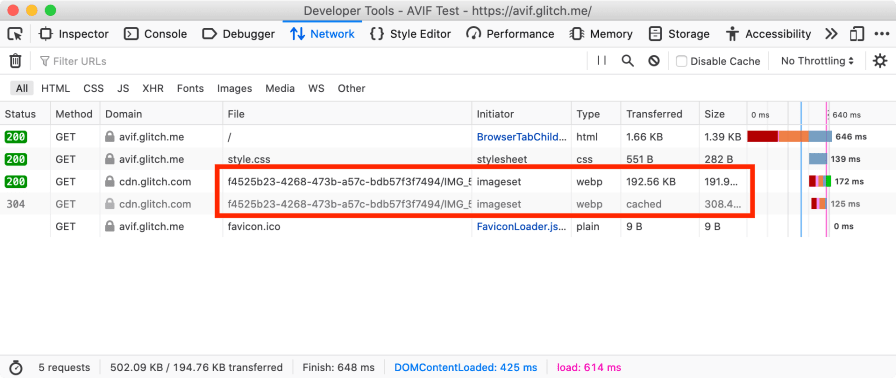
At the URL avif.glitch.me we have a page with two of the images and with the HTML picture tag.
Chrome
If you access with Chrome 85 or higher you’ll be able to see the image in AVIF format.

Firefox
If you access with Firefox, without activating AVIF support, you’ll be able to see the image in WebP format.
Safari
If you access with Safari, as it doesn’t offer support for either AVIF or WebP, you’ll be able to see the image in JPEG format.

Conclusions
I can’t hide that I’m excited to see new image formats appearing, I love them 😊. We must keep in mind that the adaptation period for image formats is very long. Now the WebP format seems completely normal to us, but remember that Google presented it in 2010.
New tools are being developed, work is being done to make ports to other languages. Operating systems aren’t capable of previewing the AVIF format, on macOS we still don’t have support for previewing WebP 😭. But well, this isn’t about us, it’s about the people who use our products, our websites… all these new technologies we should use to offer the best to those people.
If dedicating time to learning a new image format, dedicating a lot of hours to learning and testing the many combinations available to achieve the best quality/size balance, dedicating time to modify our website or product can improve UX… in my opinion, it’s worth it it’s very much worth it.